
We’re making it easier to stay connected to your care at Cooper.
We are making changes to our automated voice and text reminder system to make it easier than ever to stay informed in the ways that work best for you. In addition to reminders you may already receive about upcoming office visits, you can now receive text messages about your upcoming surgical procedures. These messages are designed to give you quick, convenient options—like confirming an appointment or making changes—without needing to call.
And the best part is that you get to decide which messages you want and how you want to receive them simply by setting your preferences in MyCooper. You can even change your language preference to Spanish if you like.
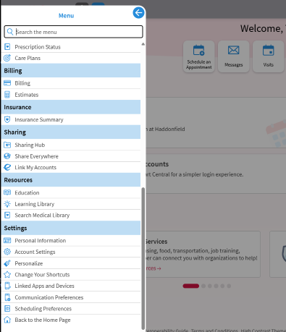
To set your preferences, go to my.cooperhealth.org, log in, and then click on the blue menu icon at the top left of your home page. Scroll down the menu to Settings, then select Communication Preferences.
On the Communication Preferences screen, expand each type of communication and use the toggles to indicate if and how you’d like to receive those messages. And while you have the option to turn off notifications, we encourage all of our patients to keep notifications turned on for the communication methods you use the most to ensure that you never miss an appointment.